

The helpdesk that reads every case, pulls in the context and drafts the reply. Your team checks it and sends.
A 45-minute demo with your own cases. We reply within a day.

AI in Nolmo
A person on every reply.
The AI does the groundwork that fills the day: reading, sorting, looking things up and writing the first draft. Nothing reaches a customer unless someone on your team sends it, until you decide otherwise.

Hi, the mirror cabinet arrived today, but the box was crushed and the door is cracked. I've attached a photo. What happens now?
IMG_2291.jpgHi Emma, I'm sorry it arrived like that. Thanks for the photo, that's all we need. A new cabinet is on its way, and you'll have tracking by tomorrow. Keep the damaged one until the carrier has been in touch.
- 9:41Case created from email
- 9:41Type, priority and team set
- 9:42Order and history pulled in
- 9:42Draft written
- Always on
- Every case gets a type, topic, priority, team and language, each with a confidence level. The customer's earlier cases and similar solved ones are pulled in, and long threads are summarised.
- Where you switch it on
- A draft in your tone of voice, and a plan for what happens next. Everything is pre-filled. You click once per step.
- When you trust it (coming)
- Nolmo keeps count of how often its drafts go out unchanged, per topic. Where the numbers are good, you will be able to let it reply on its own for that topic, such as order status or opening hours. Until then a person sends every reply.
Next steps
The plan is ready before you are.
Ask for photos, open a claim in the ERP, send a replacement. Nolmo lays out the steps and the alternatives, opens the right page in your other systems with the details filled in, and waits for your click on each one.

- Ask for photos of the damage
- Open a claim in the ERP
- 3Create a replacement orderDo it
- 4Confirm with the customerWaits for 3
Reports
See what works, and what keeps coming back.
First response, resolution and SLA against your targets, by team, type and week. Ask a question in plain words and get the numbers behind it, or have them mailed every Monday.

- Claim · damaged on arrival31+12%
- Delivery · where is my order24+4%
- Invoice · copy requested19−6%
Knowledge
Answers built on what you actually know.
Nolmo finds the questions your team keeps answering by hand, drafts the answer from what was actually sent, and makes it reusable once you approve it. Articles written in Nolmo or pulled from your website are coming.

| Article | Source | Used |
|---|---|---|
Returns and exchanges | Website· /customer-service/returns | 212 |
Delivery to the islands | Written in Nolmo· Updated by Ida, May | 88 |
Tile adhesive drying times | File· datasheet-adhesive.pdf | 41 |
Custom-cut worktopsDraft an article | Gap· Asked 14 times, no answer | — |
Opening hours, ChristmasChanged on site | Website· /stores/opening-hours | 23 |
Warranty on bathroom furniture | File· warranty-terms.pdf | 19 |
Price match | Written in Nolmo· Updated by Jonas, March | 17 |
Automations
Describe it in plain words. Nolmo builds the flow.

- WhenMonday 09:00Every week
- ThenFetch reportLast week
- ThenWrite a summarySix sentences
- ThenSend emailHead of customer service
Channels
One inbox for every conversation.
Wherever the customer reaches you, the case lands in the same queue, with the same context and the same draft waiting. Email is live today. The rest are being built with the first teams.

- EmailShared inboxes per team. Replies, notes and forwards from the same thread.
- Live chatComing soonA chat on your website. The bot answers what it knows and hands the rest to a person.
- PhoneComing soonCalls logged as cases, with the customer's orders and history on screen.
 Google reviewsComing soonEvery new review lands in the inbox with a suggested reply.
- In-storeComing soonCases the stores register, with receipts and the customer club attached.
'%20xmlns:inkscape='http://www.inkscape.org/namespaces/inkscape'%20xmlns:sodipodi='http://sodipodi.sourceforge.net/DTD/sodipodi-0.dtd'%20xmlns='http://www.w3.org/2000/svg'%20xmlns:svg='http://www.w3.org/2000/svg'%3e%3csodipodi:namedview%20id='namedview2'%20pagecolor='%23ffffff'%20bordercolor='%23000000'%20borderopacity='0.25'%20inkscape:showpageshadow='2'%20inkscape:pageopacity='0.0'%20inkscape:pagecheckerboard='0'%20inkscape:deskcolor='%23d1d1d1'%20inkscape:zoom='0.42702621'%20inkscape:cx='351.2665'%20inkscape:cy='293.89297'%20inkscape:window-width='1920'%20inkscape:window-height='991'%20inkscape:window-x='-9'%20inkscape:window-y='-9'%20inkscape:window-maximized='1'%20inkscape:current-layer='svg2'%20/%3e%3cg%20clip-path='none'%20id='g2'%20transform='translate(-0.940002,-0.91)'%3e%3cpath%20d='m%201000.94,485.90553%20c%200,278.68297%20-218.33611,484.99554%20-500.00001,484.99554%20-50.58364,0%20-99.1207,-6.66838%20-144.74082,-19.2103%20-8.86599,-2.45104%20-18.28875,-1.75604%20-26.70037,1.94548%20l%20-99.24741,43.81288%20c%20-25.95418,11.46807%20-55.25663,-6.99732%20-56.12697,-35.36414%20l%20-2.72879,-88.95303%20C%20171.05517,862.18098%20166.12877,851.925%20157.95777,844.63842%2060.667611,757.62959%200.940002,631.68181%200.940002,485.90553%200.940002,207.23536%20219.27609,0.91%20500.93999,0.91%20782.60389,0.91%201000.94,207.23536%201000.94,485.90553%20Z'%20fill='%230866ff'%20id='path1'%20style='stroke-width:12.7992'%20/%3e%3cpath%20d='M%20636.7009,625.519%20810.78129,356.48533%20c%2017.50544,-27.04083%20-14.91617,-58.51529%20-41.42711,-40.22782%20l%20-181.7215,125.3411%20c%20-6.12569,4.23141%20-14.19685,4.34532%20-20.43517,0.30334%20L%20405.91119,337.55278%20c%20-13.65289,-8.82887%20-31.87892,-4.9264%20-40.70652,8.72649%20L%20191.11149,615.32573%20c%20-17.50544,27.04083%2014.91617,58.5153%2041.42583,40.22655%20L%20414.29721,530.19966%20c%206.12569,-4.23141%2014.19685,-4.34532%2020.44797,-0.30334%20l%20161.26073,104.34916%20c%2013.65416,8.82888%2031.87892,4.92641%2040.70779,-8.72648%20z'%20fill='%23ffffff'%20id='path2'%20style='stroke-width:12.7992'%20/%3e%3c/g%3e%3cdefs%20id='defs2'%20/%3e%3c/svg%3e) MessengerComing soonMessages to your Facebook page, answered from the inbox.
MessengerComing soonMessages to your Facebook page, answered from the inbox. InstagramComing soonDirect messages, answered from the inbox.
%20--%3e%3csvg%20version='1.1'%20id='Layer_1'%20xmlns='http://www.w3.org/2000/svg'%20xmlns:xlink='http://www.w3.org/1999/xlink'%20x='0px'%20y='0px'%20viewBox='0%200%2040%2040'%20style='enable-background:new%200%200%2040%2040;'%20xml:space='preserve'%3e%3cstyle%20type='text/css'%3e%20.st0{fill:url(%23SVGID_1_);}%20.st1{fill:%23FFFFFF;}%20%3c/style%3e%3clinearGradient%20id='SVGID_1_'%20gradientUnits='userSpaceOnUse'%20x1='-277.375'%20y1='406.6018'%20x2='-277.375'%20y2='407.5726'%20gradientTransform='matrix(40%200%200%20-39.7778%2011115.001%2016212.334)'%3e%3cstop%20offset='0'%20style='stop-color:%230062E0'/%3e%3cstop%20offset='1'%20style='stop-color:%2319AFFF'/%3e%3c/linearGradient%3e%3cpath%20class='st0'%20d='M16.7,39.8C7.2,38.1,0,29.9,0,20C0,9,9,0,20,0s20,9,20,20c0,9.9-7.2,18.1-16.7,19.8l-1.1-0.9h-4.4L16.7,39.8z'%20/%3e%3cpath%20class='st1'%20d='M27.8,25.6l0.9-5.6h-5.3v-3.9c0-1.6,0.6-2.8,3-2.8h2.6V8.2c-1.4-0.2-3-0.4-4.4-0.4c-4.6,0-7.8,2.8-7.8,7.8V20%20h-5v5.6h5v14.1c1.1,0.2,2.2,0.3,3.3,0.3c1.1,0,2.2-0.1,3.3-0.3V25.6H27.8z'/%3e%3c/svg%3e) FacebookComing soonComments on your Page's posts, as cases.
FacebookComing soonComments on your Page's posts, as cases.
- Torstein IversenOrder #10416 arrived damagedTorstein Iversen · ClaimClaimDraft ready23 min
- Yusuf BrekkenIs the grey tile in stock in Drammen?Yusuf Brekken · StockStockDraft ready35 min
- Amina RahimDelivery date for order #10471Amina Rahim · DeliveryDeliveryDraft ready1 h
- Marit LundLong wait at the counter in SkiMarit Lund · ComplaintComplaintDraft ready2 h
- Morten NguyenInvoice for order #10389Morten Nguyen · InvoiceInvoiceDraft ready3 h
- Thea LundReturn without the receiptThea Lund · ReturnReturnDraft ready1 d
Details
Calm to look at. Fast to work in.
- Nothing goes out without a click
- Drafts and actions in other systems are prepared for you, never carried out behind your back.
- A morning brief, not a dashboard
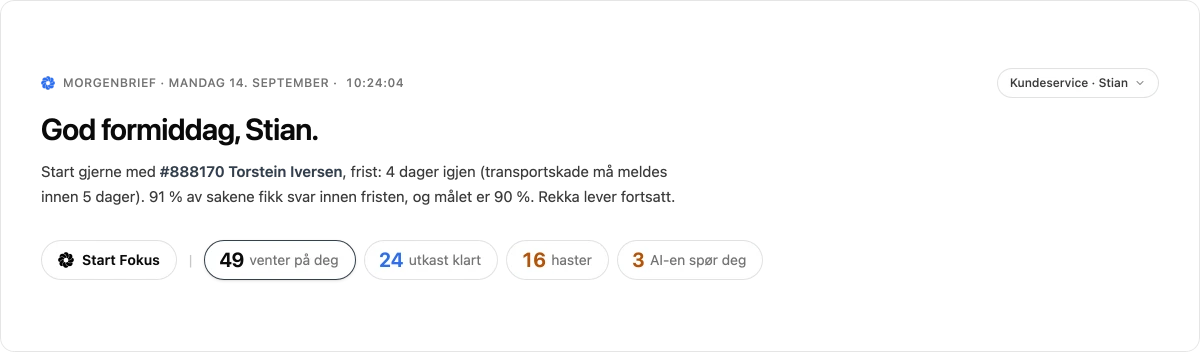
- Where to start today, what is urgent and what is already drafted, in a few sentences.
- One case at a time
- Focus mode walks you through the queue in the right order, so nobody has to hunt for the next case.
- Built to connect to the rest of the business
- Orders from your ERP, the loyalty club and in-store receipts belong inside the case. Those connections are built with the first teams, one system at a time.
See Nolmo with your own cases.
Nolmo is made by Nuto. We set up a demo with the channels and case types you already have, and show you what Nolmo would do with them.
A 45-minute demo with your own cases. We reply within a day.